Confidence Thresholds for Model Escalation Routing
OpenRouter ·
Sending every request to your strongest model gets good answers at the highest price, because you pay frontier rates for requests a cheaper model would have answered correctly. Fixed routing rules, such as picking the model by keyword or task type, cost less but need rewriting as your traffic changes.
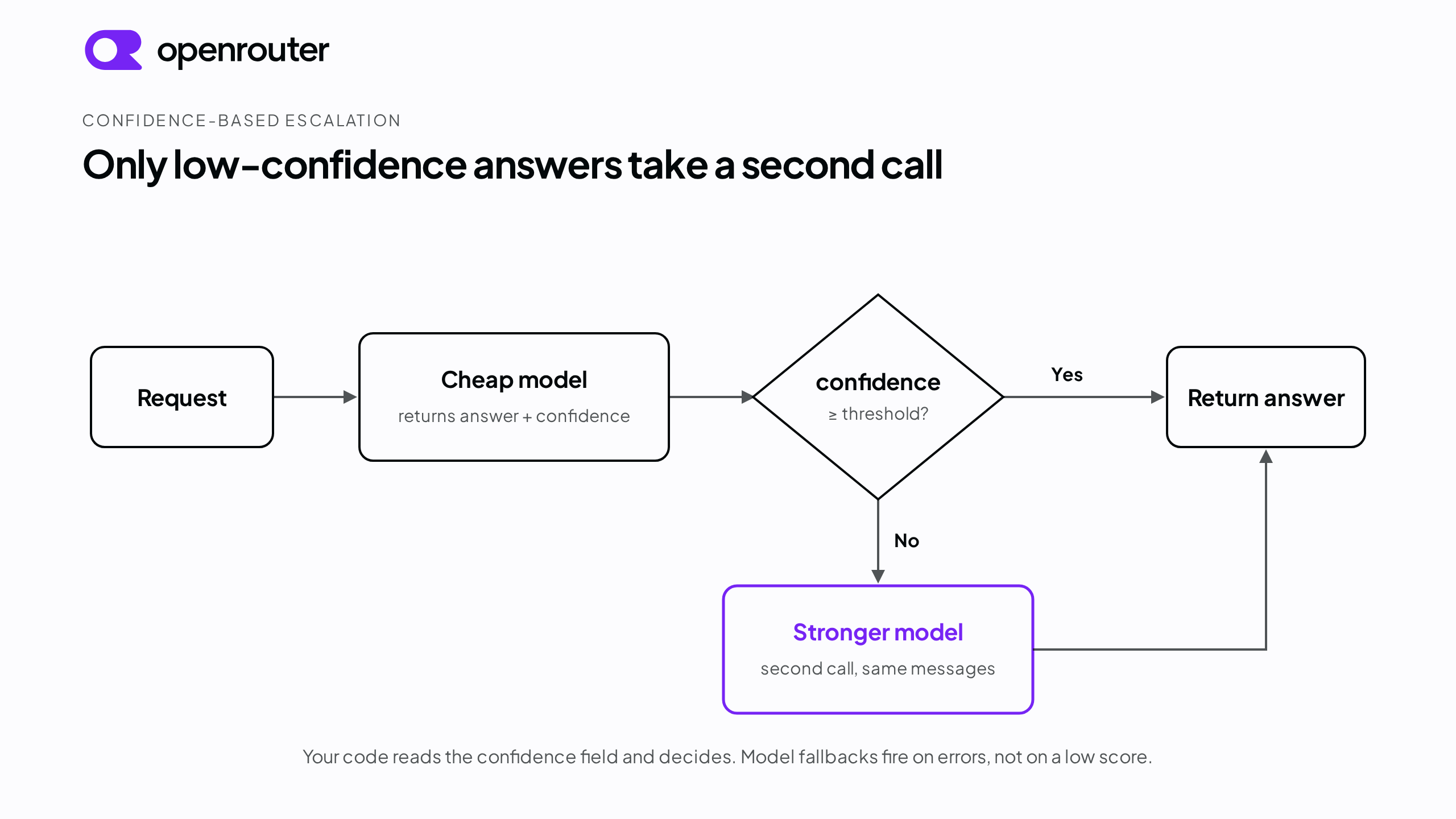
Confidence-based escalation sits between the two. You ask the model to score its own answer, then route on that score. Answers with a high score stay on a cheap model. Answers with a low score go to a stronger one. This guide sets that up in five steps.
Tl;dr
- Confidence-based escalation routes each request on a score the model reports for its own answer, so a cheap model handles the requests it is sure about and a stronger model only sees the ones it is not.
- Force the score with structured outputs. A JSON schema that requires a numeric confidence field gives you the same signal from every model, instead of guessing from hedge words in free text.
- Use the ranking, not the absolute number. A 0.85 is not a calibrated 85 percent chance of being correct. Check on your own traffic that lower-scored answers are wrong more often than higher-scored ones, and route on that ordering.
- Set the threshold from your own data. Run representative traffic through the cheap model, look at the error rate per score band, and put the cutoff where the error rate climbs.
- Treat the threshold as a setting you revisit. Log the score distribution, the escalation rate, and the error rate on non-escalated answers, and re-tune when your models or traffic change.
What the confidence score is and is not
The score is a self-report. The model produces it the same way it produces the rest of its answer, so it carries the same uncertainty. Two identical scores do not guarantee the same odds of being correct. A 0.85 on one prompt is not interchangeable with a 0.85 on another prompt or from another model, and the number is not a calibrated probability.
What you can use is the ranking, once you have checked it. Run a batch of your own requests through the cheap model, grade the answers, and group them by score. If answers in the lower score bands are wrong more often than answers in the higher bands, the ordering is usable for routing even though the absolute numbers are not. You are not looking for the score that equals 90 percent correct. You are looking for the point in the ranking that separates answers you can ship from answers that need a second call. Step 2 is that measurement.
Step 1: Get a numeric confidence field with structured outputs
Do not read uncertainty out of free text. Nothing requires a model to hedge in its prose when it is unsure, and there is no fixed vocabulary of hedge words to parse.
Make the model return a confidence field as part of a schema-validated response instead, using structured outputs. You pass a response_format of type json_schema and require both an answer and a numeric confidence between 0 and 1:
{
  "model": "openai/gpt-5.6-luna",
  "messages": [
    {
      "role": "user",
      "content": "..."
    }
  ],
  "provider": {
    "require_parameters": true
  },
  "response_format": {
    "type": "json_schema",
    "json_schema": {
      "name": "answer_with_confidence",
      "strict": true,
      "schema": {
        "type": "object",
        "properties": {
          "answer": {
            "type": "string"
          },
          "confidence": {
            "type": "number",
            "description": "How likely the answer is correct, from 0 (a guess) to 1 (certain)."
          }
        },
        "required": ["answer", "confidence"],
        "additionalProperties": false
      }
    }
  }
}
Every response now carries a numeric confidence your routing code can read directly, whichever model answered. Deciding what to escalate becomes a comparison of numbers rather than parsing language.
The schema states the 0 to 1 range in the field’s description rather than with the minimum and maximum keywords. Anthropic’s structured outputs documentation lists numerical constraints such as minimum and maximum as unsupported, so the description form is the one that works across providers. strict: true asks providers that have a native strict mode to enforce the schema exactly. Enforcement varies by provider, and some treat the schema as a strong hint rather than a guarantee, so validate the parsed JSON before you route on it.
Two checks before you rely on this. First, structured output support is set per provider endpoint, not per model, and the same model can be served by providers that do and do not support it. Filter the models page to the models with at least one supporting endpoint, and check the structured_outputs parameter in the Providers section of the model’s page. Second, set require_parameters: true in your provider preferences so we only route the request to endpoints that support every parameter in it. Without that flag, response_format is a soft preference. We route to supporting endpoints when a model has some, but if none of a model’s endpoints support it we still send the request and the parameter is ignored.
Step 2: Set a starting threshold from your own error rates
The threshold comes from measuring your own traffic, not from copying a number out of a guide. Run a representative sample of requests through your cheap model with the schema above, record the confidence score and whether each answer was correct, and set the cutoff where the error rate starts to climb. Requests above the line resolve on the cheap model. Requests below it escalate to the stronger one.
Start on the conservative side. Over-escalating at first and relaxing the threshold later costs money. Under-escalating ships confident wrong answers.
Here is a worked example. Suppose you run 200 representative requests through the cheap model and group the results by score band. The table is an illustration with internally consistent arithmetic, not a target. Your own distribution will differ.
| Score band | Share of requests | Observed error rate |
|---|---|---|
| 0.95 to 1.00 | 41% | 1% |
| 0.85 to 0.94 | 27% | 4% |
| 0.70 to 0.84 | 18% | 11% |
| 0.50 to 0.69 | 9% | 34% |
| Below 0.50 | 5% | 61% |
The error rate climbs sharply below 0.70, so 0.7 is the candidate cutoff. A threshold of 0.7 escalates the two bands under it, 14 percent of requests, and lets the other 86 percent resolve on the cheap model.
In this sample the cheap model’s overall error rate is just under 10 percent. Escalating the bottom 14 percent brings the error rate on the answers you keep down to about 4 percent, at the cost of a second call on roughly one request in seven. The point of running this on your own traffic is to find your own cutoff, not to adopt 0.7.
Step 3: Tune the threshold against accuracy, cost, and latency
A threshold trades escalation volume for error rate. Raise it and more requests get a second call, which catches more errors but costs more and runs slower. Lower it and more requests stay on the cheap model, which is faster and cheaper but lets more wrong answers through. Where you set it depends on what a wrong answer costs your product. Three things shape the choice.
Accuracy. A higher threshold sends more borderline answers for a second call, so fewer errors ship. In the worked example, moving the cutoff from 0.7 to 0.85 also escalates the 0.70 to 0.84 band, which carried an 11 percent error rate. Escalation rises from 14 percent to 32 percent of requests, and the error rate on kept answers falls from about 4 percent to about 2 percent.
Cost. Every escalation is a second model call, on top of the cheap call you already paid for. What that costs depends on the price gap between your cheap model and your escalation target and on how often you escalate. Check current per-model pricing before you commit to a target escalation rate. Both the gap between tiers and the prices themselves change as new models ship.
Latency. An escalated request makes a second round trip, so it is slower. If a large share of traffic escalates, that slow path can push against a latency budget. When your product has a hard response-time ceiling, that ceiling can cap how much you escalate before cost or accuracy does.
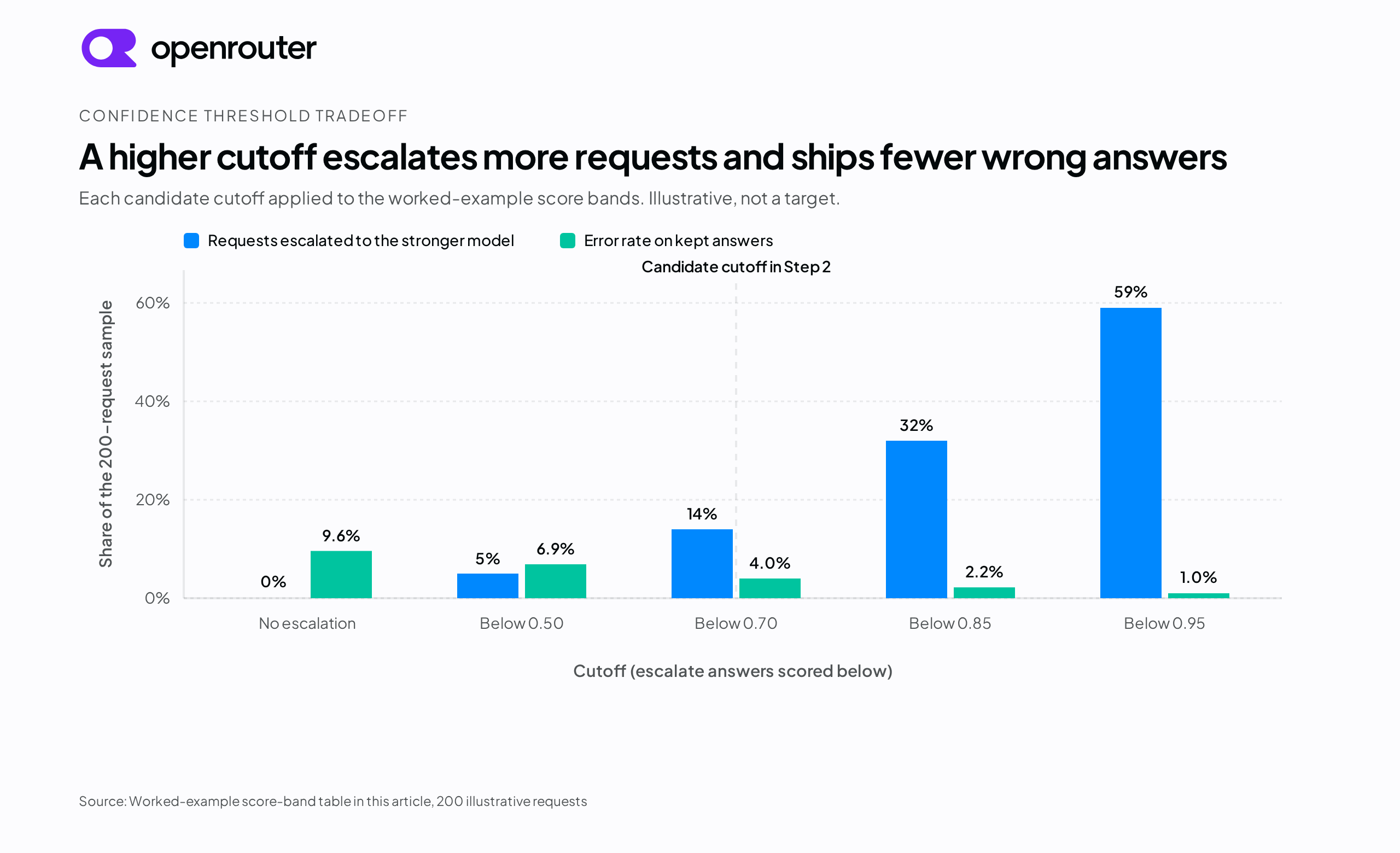
The chart applies each candidate cutoff to the worked-example table. Raising the cutoff lowers the error rate on the answers you keep and raises the share of traffic that pays for a second call. The three factors do not move independently. Raising the threshold for accuracy always adds cost and latency on the escalated share, so the right threshold is where your tolerance for wrong answers, your budget, and your response-time limit meet.
Step 4: Route low-confidence requests in your code
Once the threshold is set, your code makes the escalation decision. It reads the confidence field and, when the score is below the line, sends the request to a stronger model. We do not make that call for you. Our model fallbacks trigger when a model returns an error, not when it returns a valid answer with a low confidence score. There are two ways to structure the decision.
Retry in the same function. Wrap the call in one function. Send the request to the cheap model, read the confidence, and if it is below the threshold, send the same messages to a stronger model and return that answer. The escalation policy lives in one place, so when you change the threshold or the escalation target you change it once and no call site keeps making the old decision.
Run a separate first pass. Treat the cheap-model call as a first pass. Log its answer and score, then call the stronger model only when the score falls below the line. This takes more code, but it records how often the cheap model escalates and whether its scores still line up with real errors, which is the data you re-tune from in Step 5.
Model IDs are strings, so you can change either tier through configuration rather than code. Browse our model catalog when you pick the cheap and strong models, since the right choice at each tier changes as new models ship.
You can layer error failover under either pattern. Passing a models array lets a call fail over to the next model in the list when the first one returns an error. By default any error can trigger the fallback, including provider downtime, rate limiting, a moderation flag on a filtered model, and a context-length validation error. We price the request at the model that ultimately answered, and return that model in the response’s model field. This is a separate mechanism from your confidence escalation. It fires on errors, not on a valid low-confidence answer, so the two compose. Fallbacks keep each call alive, and your threshold decides when a live answer needs a stronger model.
Step 5: Monitor and re-tune in production
A threshold that fits at launch can stop fitting. Log three things from day one.
- The score distribution, so you can rerun the Step 2 calibration as models or traffic change.
- The escalation rate over time.
- The error rate on non-escalated answers, which is the number that tells you whether the cutoff is still doing its job.
Re-tune when something changes. Swapping the cheap model or the escalation target for a new version changes the score distribution. A shift in traffic toward harder or easier requests moves your error bands. Cost pressure can push you to accept a higher error rate for a lower escalation rate. The threshold is a setting you keep adjusting as those things change.
Common mistakes
Treating the self-reported score as a calibrated probability. The method works on ranking, not on literal likelihood. Sort a batch of answers by score and the wrong ones cluster toward the low end, but a 0.9 does not mean the answer is correct 90 percent of the time. Set your threshold from the error-rate-by-band exercise in Step 2, not from the raw number.
Using one threshold for every task type. A support bot answering “what is your refund policy” and one answering “will I be charged if I cancel today” do not carry the same cost of a wrong answer. A single global cutoff over-escalates the easy case or under-escalates the risky one. Where you know the task type, give each its own threshold.
Not watching the escalation rate after launch. A threshold that fit your calibration batch can stop fitting as traffic shifts or a model changes underneath you, and nothing raises an error to tell you.
Conclusion
Confidence-based escalation keeps requests on a cheap model when it reports high confidence and pays for a stronger model only when it does not, without keyword or task-type rules. The loop is small. Force a numeric confidence field with structured outputs. Find the cutoff from your own error rates by score band instead of picking a number. Pick the routing pattern that fits how you want to track it, one function for the policy or separate logs for the first pass. Then watch the error rate on non-escalated answers after launch and adjust as your models and traffic change.
Frequently asked questions
What is a confidence threshold?
A confidence threshold is the score below which you send a request to a stronger model instead of accepting the cheap model’s answer. Above the line, the answer ships as is. Below it, the request escalates. You set the line from your own error-rate data, not from a default number.
What is a confidence score in AI?
A confidence score is a number, usually between 0 and 1, that a model reports alongside its answer to signal how sure it is. It is a self-report, not a calibrated probability, so a 0.9 does not mean a 90 percent chance of being correct. What you can measure and rely on is the ordering. On a batch of your own requests, check that lower-scored answers are wrong more often than higher-scored ones before you route on the score.
What is the most reliable way to set confidence thresholds so a lightweight model handles most requests and defers to a premium model only when its confidence is low?
Measure it against your own traffic. Run a representative sample of requests through the lightweight model, record each confidence score and whether the answer was correct, and group the results by score band. Set the threshold where the error rate climbs sharply. The lightweight model then handles every request above the line, and only the low-confidence requests below it go to the premium model. Start conservative, then adjust as you watch the error rate on the answers you keep.
How do you escalate from a small model to a frontier model automatically?
Have the small model return a numeric confidence field with structured outputs, then let your code route on it. When the score is below your threshold, send the same request to the frontier model, either inline in the same function or as an explicit second call. OpenRouter’s model fallbacks are a separate feature. They fail a call over to another model on errors such as provider downtime or rate limits, not on a low confidence score, so keep the two mechanisms distinct.
References
- Structured outputs for
response_formatwithtype: json_schema, per-endpoint support, andstrictmode. - Provider routing for
require_parametersand the default parameter preference forresponse_format. - Model fallbacks for the
modelsarray and the errors that trigger it. - Anthropic structured outputs for the JSON Schema keywords Anthropic’s strict mode does not support.
- Models with structured output support and the model catalog for current model slugs.
- Pricing for current per-model rates.